

Someone watches your video and asks what camera that is.
Most creators just answer. For free. Every time.
This page is how you get paid for the answer instead.
Why a gear page works from view oneYou don’t need 1,000 subscribers or YouTube’s permission. Amazon pays you when someone buys through your link, so the first viewer who clicks counts.
One page beats pasting links into every description. You update it once and every old video points at the new list.
Step 1: Add it to Claude or ChatGPT- In Claude.ai, go to Settings > Capabilities and turn on Code execution and file creation. It works on the free plan. This lets Claude save your product photos into the page.
- Hit Copy the prompt above, start a new chat, and paste it in. It’s long, so Claude may show it as an attachment. That’s fine.
- Press enter. Claude asks for your Amazon links.
It works in Claude Code too: paste the prompt into a session.
If you’ll build more than one page, or update yours often, install the ZIP as a skill instead. Then you only have to say “Build my gear page.”
Using ChatGPT instead:
- Hit Download for ChatGPT at the top of this page.
- In ChatGPT, open the Plugins tab and hit Add in the top right. Upload the ZIP you just downloaded. Don’t unzip it.
- Start a new chat and say: “Build my gear and software page.”
It asks the same questions as the Claude version and builds the same page.
Step 2: Give it your Amazon tracking IDIf you’re in Amazon Associates, Claude asks for your store and tracking ID once. That’s the yourname-21 in the top right of Associates Central. It builds every affiliate link from it, so you never touch SiteStripe.
Tip: make a new tracking ID just for this page. Then Amazon’s report shows exactly what the page earns.
Not in Associates yet? Skip it. The page uses normal links, and you add the ID later.
Step 3: Say what you useClaude asks about your gear one category at a time: camera, mic, lighting, tripods, storage, bags. Just answer in your own words, like “a Sony ZV-E10 and a Rode Wireless GO”. It finds each product on Amazon and checks it has the right version.
Then it asks about your software: editing, design, email, website, hosting, scheduling. It looks up which of those pay affiliates and tells you where to join.
Add a few words on why you use each thing. That line is what makes people click.
Step 4: Pick your budget recommendationsSay what you’d recommend for someone just starting out, on a low budget, mid-range and higher end. Viewers tap their budget and see only those picks.
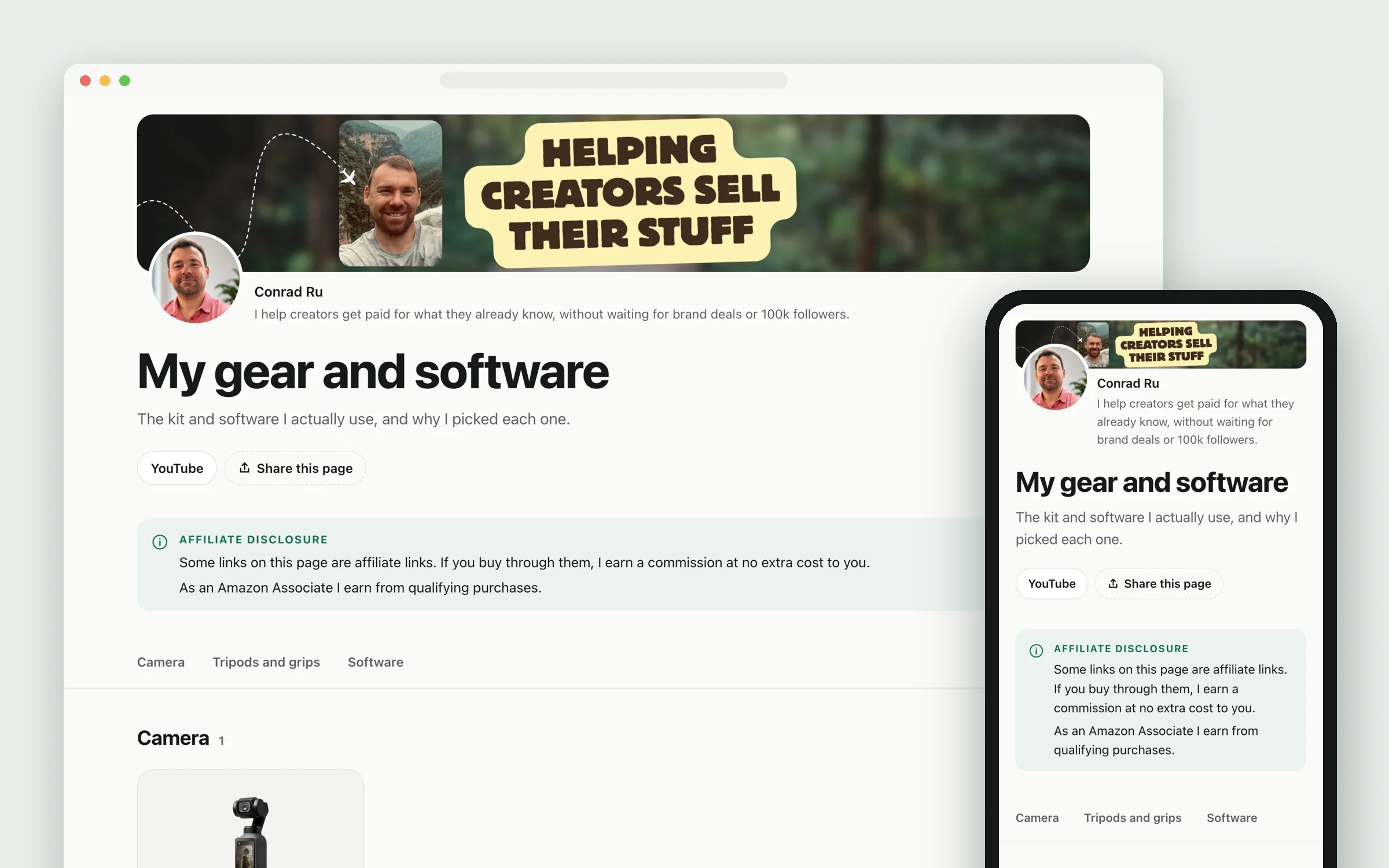
Step 5: Check it, change it, put it onlineClaude finds a clean product photo on each brand’s official site, crops it to fit, and grabs the app logos. If a brand’s photo is missing or too small, it uses a free Creative Commons photo and adds the photographer’s credit for you. Then it builds the page. It opens it for you to look at. Here’s mine to show what comes out.
Ask for changes in plain words: “move the mic to the top”, “make it navy”. When you’re happy:
- Netlify: go to app.netlify.com/drop and drag the
sitefolder onto the page. - Cloudflare: Workers & Pages > Create > Pages > Use direct upload, then drop the folder in.
Both are free.
The Amazon rules it follows for you- An Affiliate disclosure box at the top, in plain English, before anyone can click
- Amazon’s exact line, “As an Amazon Associate I earn from qualifying purchases.”, above your first link
- A small “Affiliate link” label under every affiliate button, and the full disclosure again in the footer
- No prices, because Amazon only allows prices it serves itself
- No Amazon product photos, because you’re not allowed to store them. Photos come from the brands’ official sites, or Creative Commons with the credit the licence asks for
- Every button says “See it on Amazon”, with no shortener hiding where it goes
Check your own country’s rules too. The FTC in the US and the ASA in the UK both want it clear that you earn, before someone clicks. The page does that, but it’s your name on it.
It’s a web page, not a PDF, on purpose. Amazon’s rules ban its links in printed material and ebooks. PDFs aren’t named, so they’re a grey area. A page also opens on any phone, with no file to find first.
What to do right nowWrite down five things you film with and one line on why. That’s your first draft, and it’s all the skill needs.
Then add the page’s address to your Amazon Associates account, and put the link in your next video’s description.